In short
- On one server, Claude Code runs 23 scheduled AI routines for me, plus other scripts without AI that handle short-term rentals, in-house apps, websites and advertising.
- The biggest benefit does not come from the model itself but from the safeguards around it: a lock against double runs, a retry after an outage, an alert on an error and a list of forbidden commands.
- Routines may only do what is approved in advance in their brief. The AI sends guest exceptions, new changes involving money and deploying code changes to the live website to a human to decide.
- At the end you will find a six-step process and a ready-made brief you can start with on a single process.
Claude Code is a tool from Anthropic that works directly on a computer or server: it reads files, runs commands and changes code based on a brief in plain language. In this case study I show how I use it in a small company where one person runs short-term rental operations, in-house apps and marketing. The data comes from the server configuration as of 28 November 2026.
Starting point: one person and a lot of repetitive work
My company runs short-term rental apartments. I also have my own property management system, Manordesk, the SALDAT app for tasks, finance and the company, and several websites including this one. Most of the work repeats every day: replying to guests, checking check-ins, recalculating prices, looking at ad results, checking texts and backing up data.
For that kind of work I would otherwise have to hire people or do it by hand in the evening. So I set up Claude Code to handle repetitive tasks on its own at fixed times and to call me only when a decision is needed. Below I describe how it is wired up, what failed along the way and which rules turned out to be necessary.
How Claude Code is wired into the company
The whole setup has three layers. The first is a chat session where I give larger tasks, such as a new feature in Manordesk or a campaign analysis. The second is routines, briefs saved in a file that the server starts on a timer without me. The third is plain scripts without AI that do mechanical work such as syncing, backups and reading mail.
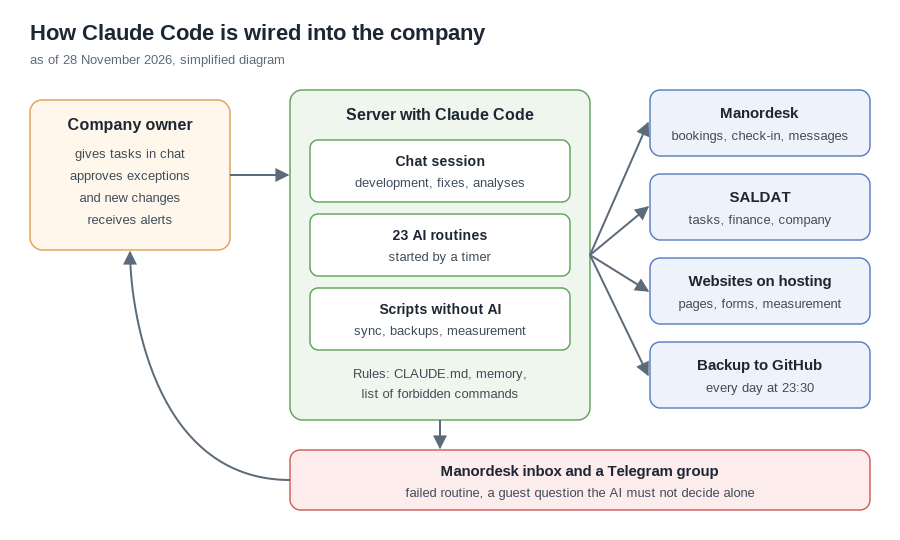
A routine needs no open window and no logged-in person, because Claude Code can run non-interactively with the -p flag and the documentation explicitly mentions use in scripts and CI (Claude Code: Run Claude Code programmatically). Each routine has its own brief file with the procedure, the limits of its authority and what it must report at the end.
The permanent project rules live in CLAUDE.md files that Claude Code loads at the start of every session (Claude Code: How Claude remembers your project). Thanks to that I do not have to explain again for every task where the database is, how deployment works or what must not be changed.
What runs during the day
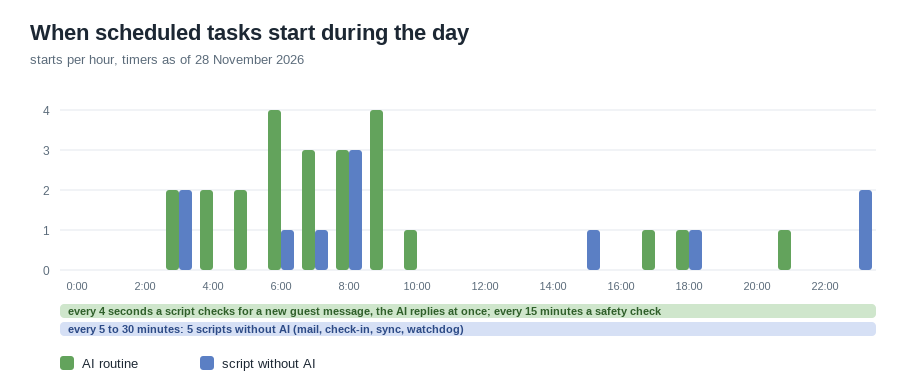
As of 28 November 2026 the server had 23 AI routines and 17 timers with scripts without AI switched on. On top of that come smaller tasks in the cron scheduler that run every minute to every few minutes. Most routines start in the morning between 3:00 and 10:00 so that most results are ready before noon, and the most run at 6:00 and 9:00, four per hour. Some routines maintain the websites, the rest handle operations, advertising and data.
| Area | Examples of routines and scripts | How often |
|---|---|---|
| Short-term rentals | checking guest messages, recalculating prices, guest reviews, evening safety check | every 15 minutes to once a day |
| In-house apps | watching for new messages, reading mail from booking portals, identity checks at check-in, operations watchdog | every 4 seconds to every 30 minutes |
| Advertising and measurement | Google Ads account overview, excluding foreign websites from campaigns, Search Console data | daily or on Mondays |
| Text checks | proofreading texts on the websites | daily at 4:00 |
| Data and backups | database backup, code backup to GitHub | daily at 23:00 and 23:30 |
The only AI routine that runs all day handles guest messages. It showed a rule I now use wherever a routine runs often: a plain script first decides whether there is anything to do at all, and the AI only gets work when the script finds an unanswered message or a check-in problem.
Process 1: guest messages in Manordesk
Guests write through Booking.com and Airbnb, and Manordesk collects their messages into one view per booking. A script without AI checks the database every 4 seconds for an unanswered message and, when it finds one, starts the AI routine at once. The 15-minute timer is only a safety net. The routine first runs a check script that prints either PRESKOCIT (skip) or BEZAT (run), and on BEZAT it loads the full detailed procedure and only then replies to the guest in their language.
The short routine brief is about 14 kB and contains the rules that always apply, including facts about each apartment. The detailed procedure is about 39 kB and covers check-in checks, identity verification, faults and escalation. The split has a practical reason: on a run with nothing to do, there is no point in the model reading the long procedure as well.
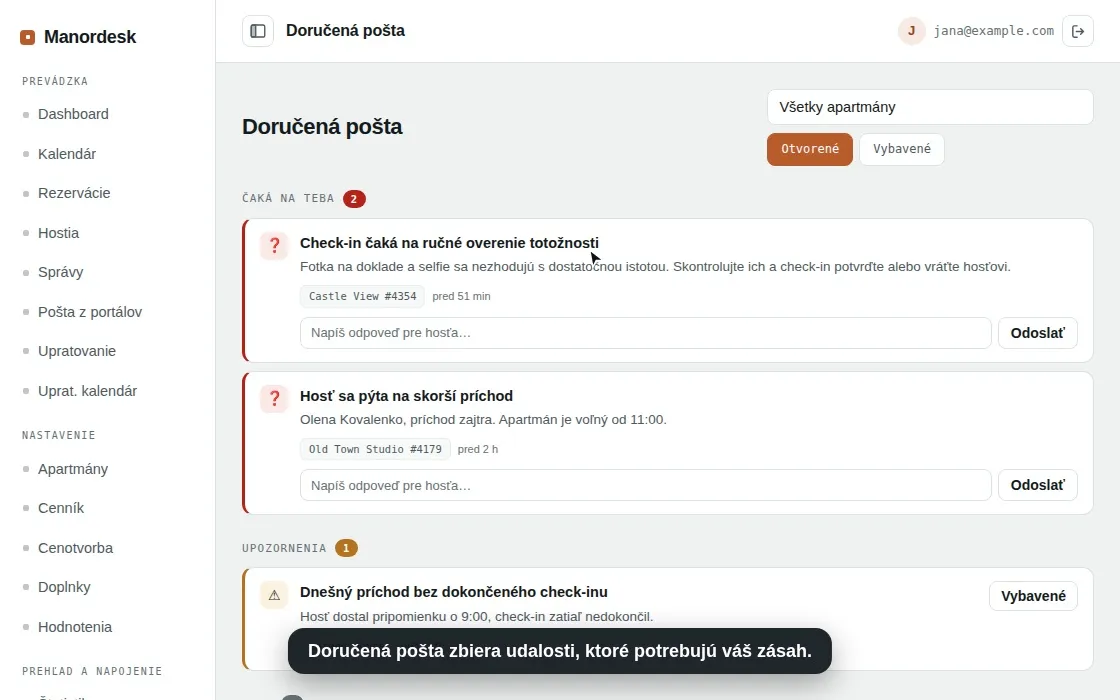
The rules grew out of specific situations, and many carry a date and a reason. For example, a guest never gets an access code in the chat, only a link to their check-in page, where the code appears only once the conditions are met. When the AI is not sure, or it is an exception it must not grant on its own, it creates an item in the Manordesk inbox, which also goes to a Telegram group.
Process 2: developing in-house apps
Both Manordesk and SALDAT were built in sessions with Claude Code where I describe a feature and check the result. Across dozens of sessions with different models, however, the same mistakes started to repeat in the code, such as the same function written twice or a missing check of whether a user may see someone else's record.
So each project has written coding rules the model must read before its first change, and SALDAT also has a list of error classes from its own audit in November 2026. The rules require checking the syntax of every changed file, actually running the change and, when fixing a bug, first showing that the bug exists and only then fixing it.
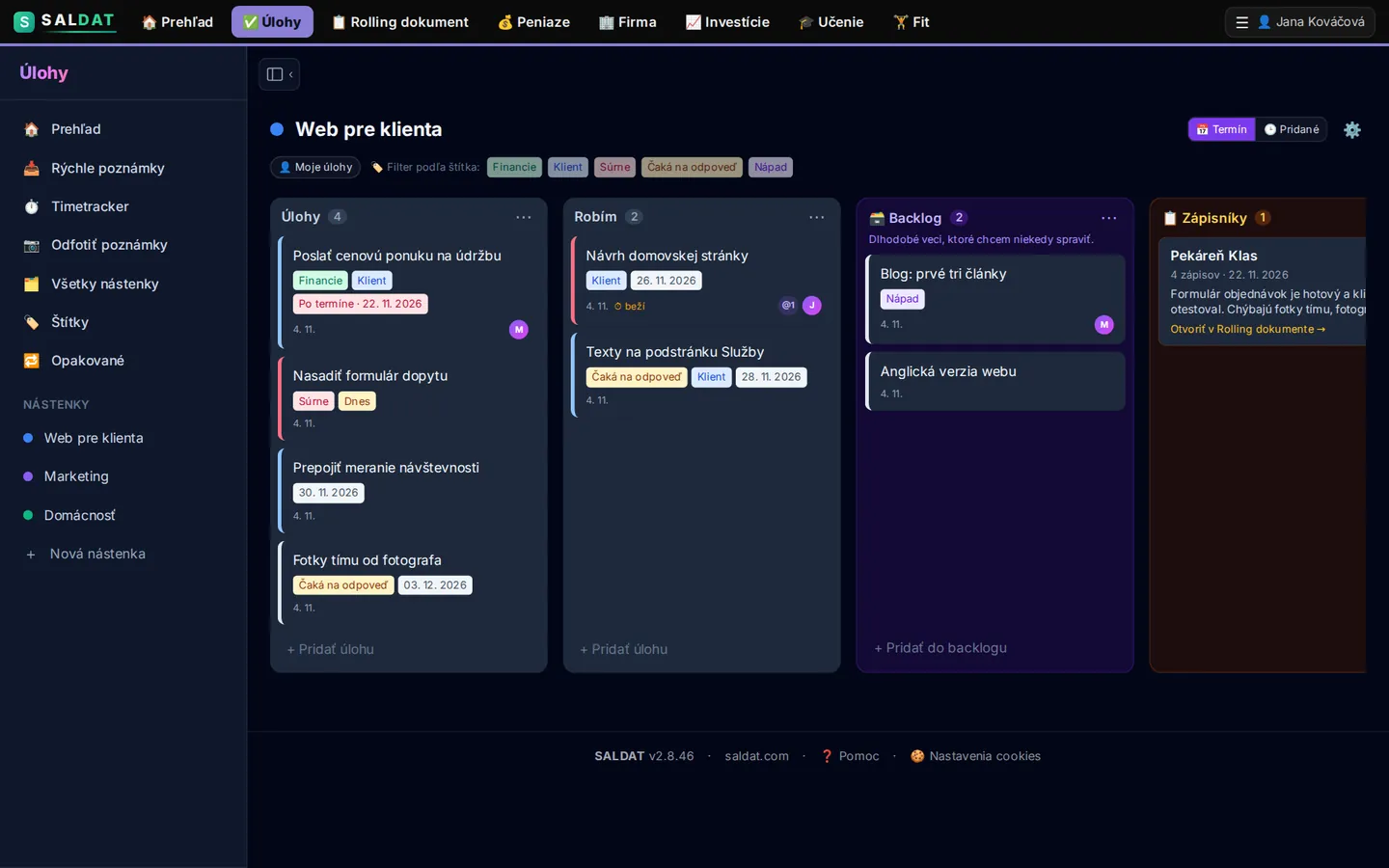
Tasks that come out of the work are written by Claude directly to the board of the Tasks module in SALDAT, under the relevant project. The reason is simple: a note in a file in the repository gets lost, while I open the board every day.
Process 3: watching over the routines themselves
A routine that silently does not work is worse than none, because you rely on it. So no routine is started directly by a timer, but by a small launcher script that adds safeguards around Claude Code.
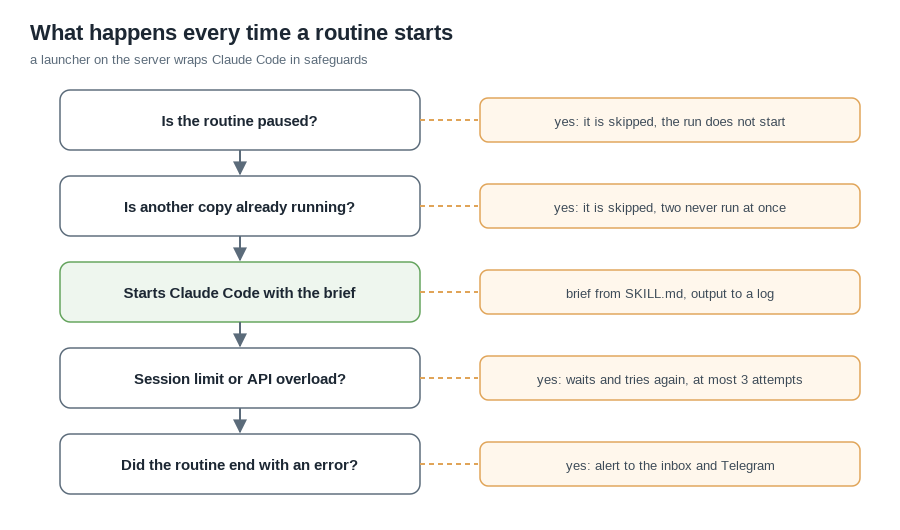
The lock against double runs and pausing a routine from the web were added as a precaution. The other safeguards were added only after a specific outage, and their history is written directly in the launcher's comments:
| Date | What happened | Safeguard added |
|---|---|---|
| 30. 8. 2026 | a routine hit the session limit 21 seconds before it reset and the run was lost | a retry after the limit resets |
| 5. and 6. 9. 2026 | a bug in a script let 11,869 failures of the message check pass without an alert | removed an early exit in the script, an alert goes out on failure, at most once every 10 minutes per routine |
| 22. 9. 2026 | automatic price recalculation failed on an API overload and prices had to be recalculated by hand | a retry on overload too, after 5 minutes |
| 9. 10. 2026 | two routines renewed the login at the same time and one failed | a temporary error is retried instead of failing |
| 5. 11. 2026 | the routines' login was valid for only about 30 days | a long-lived token and a nightly validity check at 2:30 |
These cases lead to the main lesson of the whole study. The model rarely makes mistakes in routines, but its surroundings do: limits, login, concurrent runs and scripts that report success even though they did nothing.
Rules between the human and the AI
Claude Code has a list of allowed and forbidden commands in its settings, and the documentation states that deny rules apply immediately (Claude Code settings). On my server this forbids Claude from, for example, wiping the whole disk, managing system services and editing the task scheduler, so I make such changes myself.
Besides the technical bans, several agreements apply, written in memory and in the briefs:
- A routine may only do what its brief says, for example recalculating prices according to the price list rules. Outside the brief, deploying code to the live website, writing to the production database and anything involving money need explicit approval of that specific step.
- A claim on the website or in a message to a guest must be verified in a source, not in the model's memory.
- Before an important output, another independent agent checks it with the brief to find mistakes, not to judge it.
- When a permission blocks something, the AI does not work around it with a script, it says so in one sentence.
- The report at the end distinguishes what is done and verified, what is done but not verified and what did not work.
These rules did not appear all at once, but each time after a situation where, without them, there would have been damage or a false claim.
How to start with one process
The whole system was not built at once, and another company does not need all of it. It is best to start with one process that repeats daily and has a clear result.
- Pick a process that takes a person at least a few minutes a day and has a clear output, such as an overview of new inquiries or an order check.
- Write the brief as you would for a new colleague: where the data is, what to do, what not to do and what to report at the end.
- For the first two weeks, start the routine by hand and read every output.
- Add a check script that decides whether there is anything to do at all, so the model does not run for nothing.
- Only then put it on a timer and send error alerts to a place you actually read.
- Write every mistake into the brief with its date so it does not happen again.
The brief for a first routine can look like this, for example:
You are an assistant that checks new inquiries from the website form.
1. Run the script kontrola.py. If it prints PRESKOCIT (skip), write one sentence and stop.
2. If it prints BEZAT (run), read the new inquiries from the file the script named.
3. For each inquiry write a draft reply, but DO NOT SEND it.
4. Save the drafts to the navrhy/ folder with the date in the name.
5. Never change prices, never promise a date and never delete any files.
6. At the end write: the number of inquiries, the number of drafts and what you could not decide.
If you want to build a similar process for your company, see the AI process automation service. More general articles about Claude, ChatGPT and Gemini are in the AI in business blog (in Slovak).
Frequently asked questions
Do I need my own server for Claude Code?
No, Claude Code also runs on your own computer. A server makes sense when routines should run at night or every 15 minutes whether or not your computer is on.
Does the AI answer guests completely on its own?
Routine questions such as parking or arrival time, yes, but only according to the rules and the data in Manordesk. Requests for an exception or compensation, a disputed identity check and anything the rules do not cover go to the inbox for a human to decide.
What happens when a routine fails?
The launcher detects the error exit code and sends an alert to the Manordesk inbox and to Telegram, at most once every 10 minutes per routine. On a session limit or API overload it first retries the run on its own, up to three attempts in total.
How do you stop the AI from making an irreversible change?
With a combination of a list of forbidden commands in the Claude Code settings, a narrow brief for each routine and a rule that deployment, writes to the production database and payments outside the brief need explicit approval of that specific step. Database and code backups run every evening independently of the AI.
Why doesn't everything run through the AI when you already have it?
Mechanical work such as syncing, backups or reading mail is done more reliably and more cheaply by a plain script. AI makes sense where it has to understand text, decide according to rules or write a reply.